
This site uses cookies to enhance your user experience. By clicking any link on this site you are giving your consent to our cookie policy. Read more
Reject
Accept All

Advertiser and Editorial Disclosures

GroupMe

GroupMe

4.6
Rating
10,000,000+ Downloads
15.25.4 Version
Advertisement
Screenshot 1
Screenshot 2
Screenshot 3
Screenshot 4
Screenshot 5
Screenshot 6
Screenshot 7
Screenshot 8
Screenshot 9

Information

  • Category: Communication
  • Price: free
  • Age Rating: Teen
  • Available on: /
  • Developer: GroupMe
  • Updated on: Jul 7, 2026
Advertisement
GroupMe is a messaging app designed for group communication, allowing users to create and manage chat groups easily. Launched in 2010, it enables users to send messages, share photos, and coordinate events with friends, family, or colleagues. With features like direct messaging and the ability to include users without the app via SMS, GroupMe fosters seamless connectivity and collaboration, making it a popular choice for both casual and organized group interactions.

Features & Highlights

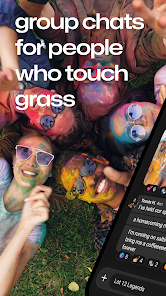
  • Group Chats: GroupMe allows you to create and manage group chats effortlessly. Whether you're planning a weekend getaway with friends or coordinating a project with colleagues, the group chat feature keeps everyone in the loop. For instance, I recently organized a surprise birthday party, and the group chat made it easy to share ideas, assign tasks, and keep track of RSVPs.
  • Media Sharing: One of the standout features of GroupMe is its ability to share photos, videos, and GIFs seamlessly. During a recent family reunion, I used this feature to share candid moments in real-time, allowing everyone to relive the fun as it happened. It added a layer of excitement and engagement that traditional messaging apps often lack.
  • Customizable Notifications: GroupMe offers customizable notifications, which means you can choose how and when you want to be alerted about new messages. This is particularly useful for busy professionals like me who want to stay connected without being overwhelmed. I set my notifications to silent during work hours, ensuring I only catch up on messages during breaks.
  • Direct Messaging: In addition to group chats, GroupMe allows for one-on-one direct messaging. This feature is perfect for quick conversations or private discussions. I often use it to check in with friends or colleagues without cluttering the group chat with side conversations.
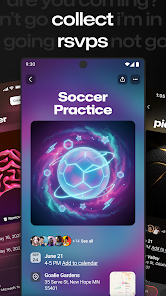
  • Event Planning Tools: GroupMe includes built-in tools for event planning, such as polls and RSVP options. I recently used this feature to plan a team outing, where I created a poll to decide on the best date. It streamlined the decision-making process and ensured everyone had a say.

Real Experience Using "GroupMe"

Application Scenarios

As someone who juggles both personal and professional commitments, I find myself using GroupMe in various scenarios. For instance, during my college days, I relied on GroupMe to coordinate study groups with classmates. We would create a group chat to share notes, discuss assignments, and even schedule study sessions. Fast forward to my current job, and I still use GroupMe to communicate with my team. We have a dedicated group chat for project updates, where we share files and brainstorm ideas. The app has become an essential tool for collaboration, making it easier to stay connected regardless of where we are.

User Experience

The user interface of GroupMe is clean and intuitive, making it easy for anyone to navigate. Upon opening the app, I’m greeted with a simple layout that displays my chats prominently. The workflow is smooth; sending messages, sharing media, and accessing group settings are all straightforward. I particularly appreciate the ability to react to messages with emojis, which adds a fun element to conversations. Performance-wise, I’ve experienced minimal lag, even when sharing large files or images. Overall, my experience with GroupMe has been positive, as it combines functionality with a user-friendly design.

Pricing

GroupMe is completely free to use, which is one of its most appealing aspects. There are no hidden fees or premium subscriptions, making it accessible for everyone. The app is ad-supported, but I’ve found the ads to be non-intrusive, allowing me to enjoy the messaging experience without constant interruptions. This free model is particularly beneficial for students and budget-conscious users.

Updates & Support

GroupMe regularly updates its app to enhance user experience and introduce new features. I’ve noticed improvements in performance and additional functionalities over time, which shows the developers are committed to keeping the app relevant. In terms of support, GroupMe offers a comprehensive help center on their website, where users can find answers to common questions. I’ve reached out for assistance once, and the response was prompt and helpful, which left me feeling valued as a user.

Security & Privacy Review

When it comes to security and privacy, GroupMe takes several measures to protect its users. The app is available on both the App Store and Google Play, ensuring it meets the necessary security standards for mobile applications. During registration, users are required to provide basic personal information, such as a phone number or email address, which is standard for messaging apps. However, I appreciate that GroupMe does not require excessive personal data, which helps maintain a level of privacy. In terms of ads and tracking behavior, GroupMe does display advertisements, but they are not overly intrusive. The app does collect some data for advertising purposes, but users can manage their privacy settings to limit tracking. Overall, I feel comfortable using GroupMe, knowing that my personal information is handled with care and that I have control over my privacy settings.
Pros
  • Easy group messaging for seamless communication
  • Customizable chat settings for personalized experience
  • No phone number required for added privacy
  • Supports multimedia sharing for richer interactions
  • Available on multiple platforms for accessibility
Cons
  • Limited customization options for notifications
  • Difficult to manage large group sizes
  • Lacks advanced features found in other apps
  • Reliance on internet connection can hinder access
Advertisement
Advertisement

User Reviews

(610K Reviews)
  • Aiden Reilly
    2024/09/05

    Amazing app, I use it for a lot of school stuff and it's a great form of communication for 30 people or so to use rather than a group chat through text. One problem though. I signed up a while ago and used my deadname to sign up since I hadn't had a preferred name yet, but when I go to change it I can see the change on my profile but not on my messages. I don't know if this is a personal thing or everyone can see my username as my deadname, but if that could be changed, I'd greatly appreciate it

  • Valerie Skinner
    2026/06/24

    Great app. I just wish the poll option was not anonymous. Also why was the video option removed from calendar events? New Review 6/24/26 since I couldn't add it separately. I don't like the change to the calendar option. It's changed within my app but hasn't seem to change in others. You can no longer add a specific location. Some options just don't need an update.

  • Andrea
    2026/06/17

    maybe an update happened? now, my messages won't load in my groups unless I sign out and sign back in. sometimes when I sign out I have to sign back in several times for my groups to even appear. when I click on help it takes several hours to get to chat with someone, and they only tell me to log out and log back in. if I didn't need to be in a group I would get rid of the app. I might just have to leave and rely on friends to update me via text.

  • Katie Strohmeyer
    2026/05/26

    So I had to download this app again after switching phones, and its pretty decent. you can message pretty much anyone in the group, the individual messages are slightly annoying that you have to accept the person messaging first before you can read them. Other than that, it's an overall decent app to use and track with everyone.

  • Vic Gibson
    2026/05/25

    the app had an update and now I cannot get back into it. I've tried all the emails I have. To reset my password it says it's going to send an email, yet it never shows up. there isn't an option to send the reset link to my phone, even when I use my number to log in. I have uninstalled and installed again with the same issue. Please help.

Review Source: Google Play store public user reviews.

FAQ

Does GroupMe collect my personal data?

Yes, GroupMe collects certain personal data such as your phone number, email address, and usage information to improve the app and provide services.

Does GroupMe offer a free trial or free version?

GroupMe is completely free to use, and there are no subscription fees or trials involved.

Does GroupMe require an internet connection?

Yes, GroupMe requires an internet connection, either via Wi-Fi or mobile data, to send and receive messages.

How can I contact support or send feedback for GroupMe?

You can contact GroupMe support through the app's settings or by visiting their official website, where you can find resources and a contact form for feedback.

How do I manage or cancel my GroupMe subscription?

Since GroupMe does not have a subscription model, there is no need to manage or cancel a subscription. Users can simply stop using the app at any time.

How to use GroupMe

How can I contact Customer Service for GroupMe?

You can reach GroupMe Customer Service through the app's help section or visit their official website for support options.

How do I find the Customer Service number for GroupMe?

GroupMe does not provide a direct customer service number; support is primarily through their app and website.

How do I log in to my GroupMe account?

Open the GroupMe app, enter your phone number or email, and follow the prompts to log in.

Is there a way to activate my GroupMe account?

GroupMe accounts are activated automatically after signing up; just verify your phone number or email to complete the process.


What's New

  • - Better Sign In: A revamped sign-in flow with added multi-factor authentication for extra peace of mind.- Event Links: Add links to your events so everyone has what they need in one tap.- Event Waitlists: When an event reaches capacity, join the waitlist and grab a spot if one frees up.- Friend Suggestions: Connecting with folks on GroupMe just got faster with people you may know suggestions.Keep the feedback coming – thanks for being part of the GroupMe community #)
Advertisement