This site uses cookies to enhance your user experience. By clicking any link on this site you are giving your consent to our cookie policy. Read more
Reject
Accept All

Advertiser and Editorial Disclosures

ScanNow Home

ScanNow Home

4.2
Rating
500,000+ Downloads
1.1.96 Version
Advertisement
Screenshot 1
Screenshot 2
Screenshot 3
Screenshot 4
Screenshot 5
Screenshot 6
Screenshot 7
Screenshot 8
Screenshot 9
Screenshot 10
Screenshot 11
Screenshot 12
Screenshot 13
Screenshot 14
Screenshot 15
Screenshot 16
Screenshot 17
Screenshot 18

Information

  • Category: Productivity
  • Price: free
  • Age Rating: Everyone
  • Available on: /
  • Developer: Homescreen Apps
  • Updated on: Jun 24, 2026
Advertisement
Introducing ScanNow Home, your ultimate solution for effortless document management! With our user-friendly app, you can quickly scan, store, and organize important papers right from your smartphone. Say goodbye to clutter and hello to efficiency as you digitize receipts, contracts, and more in seconds. Enjoy seamless sharing and secure cloud storage, ensuring your documents are always at your fingertips. Transform the way you manage your paperwork with ScanNow Home—where convenience meets innovation!

Features & Highlights

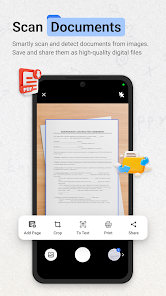
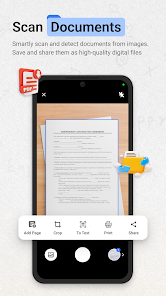
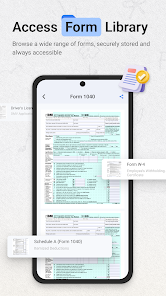
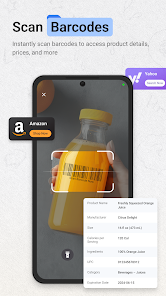
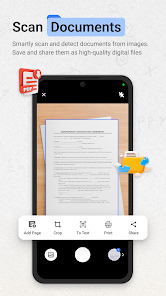
  • Instant Document Scanning: ScanNow Home allows you to quickly scan documents using your smartphone camera. Imagine needing to send a signed contract to a client while on the go; with just a few taps, you can capture, save, and share it instantly.
  • OCR Technology: The app features advanced Optical Character Recognition (OCR) that converts scanned images into editable text. This is particularly useful when you need to extract information from a printed document, like a recipe or a business card, and save it directly into your contacts or notes.
  • Cloud Integration: ScanNow Home seamlessly integrates with popular cloud storage services like Google Drive and Dropbox. For instance, if you’re working on a project and need to share scanned documents with your team, you can upload them directly to your cloud account without any hassle.
  • User-Friendly Interface: The app boasts an intuitive design that makes navigation a breeze. Whether you’re a tech-savvy individual or someone who struggles with apps, you’ll find it easy to scan, edit, and share documents.
  • Multi-Format Support: ScanNow Home supports various file formats, including PDF and JPEG. This flexibility means you can choose the format that best suits your needs, whether you’re archiving documents or sharing images.

Real Experience Using "ScanNow Home"

Application Scenarios

As someone who juggles multiple responsibilities, I often find myself in situations where I need to digitize documents quickly. One of my favorite scenarios is during meetings. I frequently attend brainstorming sessions where notes are scribbled on whiteboards. With ScanNow Home, I can snap a picture of the board, and within seconds, I have a digital copy to refer back to later. Another instance is when I receive important paperwork in the mail. Instead of letting it pile up, I scan it immediately, ensuring I have a backup and can easily share it with my colleagues.

User Experience

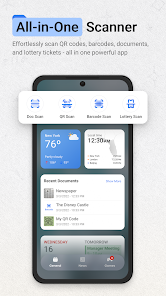
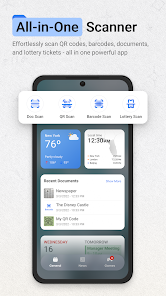
The first time I opened ScanNow Home, I was greeted by a clean and straightforward interface that made me feel at ease. The main screen features a large scan button, which is exactly what I need when I’m in a hurry. The workflow is seamless; I simply point my camera at the document, and the app automatically detects the edges and captures the image. The editing tools are intuitive, allowing me to crop, rotate, and enhance the scanned document effortlessly. Performance-wise, the app is quick and responsive, with scans processing in mere seconds. Overall, my experience has been overwhelmingly positive; it feels like having a portable scanner in my pocket.

Pricing

ScanNow Home offers a free version with essential features, which is perfect for casual users. However, for those who need advanced functionalities like unlimited cloud storage and premium OCR capabilities, the subscription plan is reasonably priced. I found the investment worthwhile, especially considering how much time and effort it saves me in my daily tasks.

Updates & Support

The developers of ScanNow Home are proactive in providing updates, which is evident from the regular enhancements I’ve noticed since I started using the app. They also offer a comprehensive support section within the app, complete with FAQs and troubleshooting tips. Whenever I’ve had questions, I’ve found their customer service to be responsive and helpful, which adds to my overall satisfaction with the app.

Security & Privacy Review

As an American user, security and privacy are paramount when using any app, especially one that handles sensitive documents. ScanNow Home is available on both the App Store and Google Play, which adds a layer of credibility. During the registration process, I was required to provide minimal personal data, which I appreciated. The app does not bombard users with ads, and I have not noticed any intrusive tracking behavior, which is a significant plus for me. Overall, I feel confident that my data is secure while using ScanNow Home, allowing me to focus on my tasks without worrying about privacy concerns.
Pros
  • Discover the advantages of the ScanNow Home app:
  • Effortlessly scan documents and images
  • Organize files with ease and speed
  • Share files securely with others
  • Access your scans anytime, anywhere
  • User-friendly interface for all ages
Cons
  • Limited scanning options available
  • Occasional bugs in functionality
  • Requires internet for updates
  • User interface can be cluttered
Advertisement
Advertisement

User Reviews

(4.5K Reviews)
  • Hondo Colin
    2026/06/28

    finally an app that does everything in one at first I thought ScanNow Home let me see. To my surprise it's exactly what I need with signature and all thanks for making life simpler.

  • Phil Bender
    2026/02/07

    I just installed this app, canned a product bar code on a product and too me to some unrecognized page so I closed it. I then noticed that my entire desktop over multiple screens were hi-jacked, completly changed and immediately placed my phone in airplane mode with wi-fi turned off. Tried to uninstall app, it's grayed out, not available. Still trying to uninstall and restore desktop icons, DON'T INSTALL THIS APP.

  • marco “marcoislander” islander
    2026/04/26

    This app should be called SCAM NOW that's what it is it loaded ads in my App heading top and keeps popping up do you like the App and you think you delete it but i guarantee if you look deep you will see it did not. What a mistake i made loading this App.

  • Jessica Lambert
    2025/03/26

    Amazing app for all of my scanning needs! Download it you won't be disappointed!

  • robert king ııı
    2026/03/12

    DO NOT download this! full of bloatware and not a true PDF scanner. It accesses your camera and cuts off documents so you have a cleaner photo, it does convert it to a PDF, but this lacks what other apps do much better. on top of that it has an annoying widget that turns on automatically that changes your home screen design and apps. uninstalled immediately after using!

Review Source: Google Play store public user reviews.

FAQ

Can I edit scans within the ScanNow Home app?

Yes, the ScanNow Home app provides basic editing tools that allow you to crop, rotate, and enhance your scans. You can also apply filters and adjust brightness and contrast to improve the quality of your scanned documents.

Can I organize my scanned documents within the app?

Yes, the ScanNow Home app allows users to organize their scanned documents into folders or categories for easy access. You can create custom folders and move documents to keep your scanned files organized.

Can I share my scanned documents directly from the app?

Absolutely! The ScanNow Home app allows users to share their scanned documents directly via email, messaging apps, or social media. You can select the document you wish to share and choose your preferred sharing method within the app.

Can I use the ScanNow Home app without an internet connection?

Yes, the ScanNow Home app can be used offline to scan documents. However, certain features like cloud storage integration and sharing options may require an internet connection to function properly.

Does the ScanNow Home app have cloud storage integration?

Yes, the ScanNow Home app supports integration with popular cloud storage services such as Google Drive, Dropbox, and OneDrive. This feature enables users to back up their scanned documents securely and access them from any device connected to the cloud.

How to use ScanNow Home

How can I contact customer service for the ScanNow Home app?

You can reach customer service through the app's settings or visit the official website for contact details.

How do I activate the ScanNow Home app?

To activate, open the app and follow the on-screen instructions after entering your activation code.

How do I log in to the ScanNow Home app?

Open the app, enter your registered email and password, then click on the login button.

Is there a customer number I can call for support?

Yes, the customer support number is available on the official website under the contact section.

What's New

  • Bug fixes and stability improvements
Advertisement